How to factory reset the in.touch 3 EN (Home) module
Last updated About 7 hours ago
When to do this
A factory reset is done on the Home module itself. Only do it in these cases:
You're selling or giving away your spa or your in.touch 3. Delete the spa from your account first (☰ menu > Settings > General > scroll down > Delete my spa), then reset the Home module so the new owner can set it up.
You bought a used spa or a used in.touch 3, and the previous owner has removed the spa from their account. See I purchased a used spa or a used in.touch 3 unit.
Our team asked you to, for example when setup was interrupted and your spa doesn't show up in the app, or when a setup error keeps coming back.
Not sure? Contact us in the chat first: we can often fix it without a reset.
A reset won't help if
Your spa shows offline or keeps disconnecting. See The app says my spa is offline or My spa keeps disconnecting.
The Home module and the Spa module can't link. See My Home module blinks and never links to the spa.
The pairing key is rejected. Contact us in the chat with both serial numbers.
Before you start
A factory reset erases the secure link between the Home module and the Spa module, so you will need to set up your spa again in the Gecko app.
If you have a Premium subscription, note its status in ☰ menu > Settings > Subscription. You will check it again after setup.
Make sure the Home module is plugged in and its light is on.
Have a paper clip or a similar small tool ready.
Steps: factory reset the Home module
Prefer to watch? See the video: in.touch 3 Factory Reset
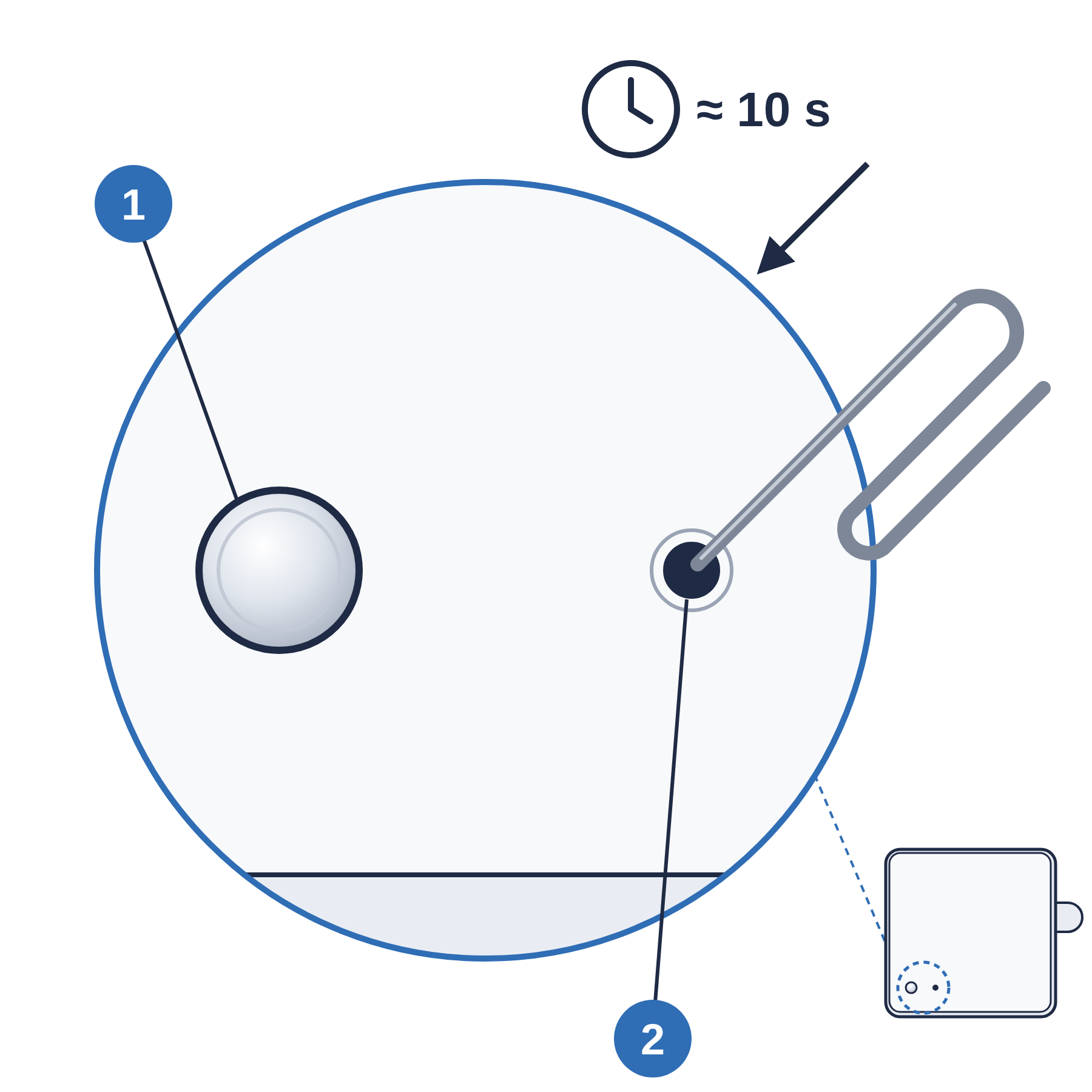
Find the small pinhole on the Home module.
Insert the paper clip and press gently. Keep holding for about 10 seconds, until the light turns red.
Release the button. The reset starts on its own, and the light may go through several colors.
Wait for a solid green light. The reset is complete.
Set up your spa again in the Gecko app. See Set up your spa in the Gecko App.
If you have Premium, check ☰ menu > Settings > Subscription. If it doesn't show, contact us in the chat.
If the spa doesn't appear during setup after the reset, see After a factory reset: in.touch 3 Home won't connect to the app.
1 Light · 2 Reset hole: press with a paper clip for about 10 seconds
Still stuck? Send us these in the chat
The color of the Home module light
Why you reset it (used spa, selling it, or our team asked you to)
Whether your Premium subscription shows in the app
Was this helpful?
Still need help? Ask the team