Pair the CO (Spa) and EN (Home) modules
Last updated 12 months ago
Overview
The CO (Spa) and EN (Home) modules of the in.touch 3 system are designed to communicate wirelessly using RF (radio frequency). They come pre-paired from the factory, so pairing is normally not required during installation.
However, if you replace one of the modules or perform a factory reset, you may need to pair them again manually. Follow the steps below to pair your modules safely and correctly.
When to perform pairing
You replaced either the CO (Spa) or EN (Home) module.
Your modules are not communicating (e.g., blinking LED indicating no link).
You performed a factory reset on one module.
Before you begin
Make sure both modules are properly installed and powered.
Ensure only one spa in your area is powered on, this avoids pairing with the wrong module.
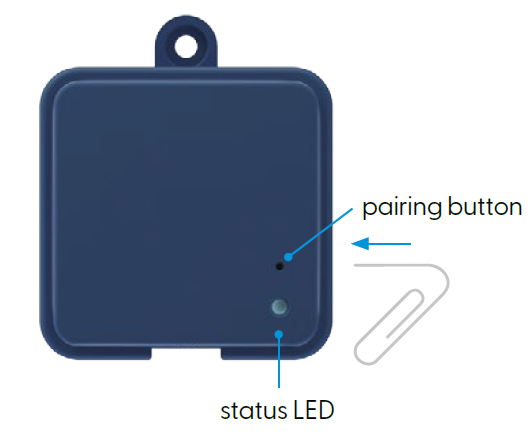
Have a small tool like a paper clip ready to press the pairing button on the EN module.
Step-by-step pairing instructions
Power up the EN (Home) module
Plug in the EN module and wait until its LED turns on.
Confirm it’s functioning and connected to power.
Activate pairing mode on the EN module
Using a paper clip or similar tool, press and release the small pairing button on the EN module.
The LED will flash rapidly in yellow, indicating it’s now in pairing mode.
The EN module will stay in pairing mode until it successfully pairs or until it’s reset by unplugging the power.
Restart the spa (CO module)
Turn off the spa breaker to cut power to the CO module.
Wait a few seconds, then turn the breaker back on.
As the CO module powers up, it will automatically detect the EN module in pairing mode.
Wait for pairing to complete
Within a few seconds, the EN module’s LED should stop flashing yellow.
Both modules’ LEDs should display solid blue, indicating a successful RF connection.
After pairing
Each EN module can only be paired with one CO module at a time.
You can re-pair modules as often as needed, following the same steps.
Important notes
⚠️ Only the EN (Home) module can initiate pairing.
The process must always begin by putting the EN module into pairing mode.
💡 In multi-spa environments (e.g., showrooms):
Only power up one spa at a time while pairing. The first spa detected will pair with the EN module, and any others powered on simultaneously will be ignored.
Troubleshooting pairing issues
If the pairing fails or LEDs keep blinking:
Verify both modules are powered on and within range (typically under 50 ft / 15 m).
Repeat the pairing process from step 2.
If the LED remains yellow or no connection forms, reset both modules and try again.
For detailed LED behavior, see the LED status reference guide – EN (Home) module
Was this helpful?
Still need help? Ask the team